Your first weapon
You will make Training Blade, a katana that appears in the weapon shop at level 1 for one coin. You need an Eclipse build, a text editor, and the sample image linked below. You do not need Unity or a Lua installation; Eclipse runs the script for you.
If code is new to you, keep Lua basics open alongside this page. Copy each complete file first, get the mod working, then experiment.
1. Create the folder
Section titled “1. Create the folder”Open the game’s Mods directory and make a folder called tutorial.blade. In a standalone desktop installation, Mods is beside the game executable; when working from the project, use its root Mods folder. A launcher-managed installation may use a shared Mods directory outside its version folders; use that installation’s configured directory. Create these subfolders and files:
Mods/ tutorial.blade/ mod.toml scripts/ main.lua localizations/ eng.toml assets/ sprites/ weapon.asset textures/ weapon.pngEnable file extensions in your file manager so you do not accidentally create main.lua.txt or mod.toml.txt. Save text files as UTF-8. mod.toml must be directly inside the mod folder, without an extra enclosing folder.
2. Tell Eclipse about the mod
Section titled “2. Tell Eclipse about the mod”Create mod.toml with this exact content:
schema = 1id = "tutorial.blade"name = "Training Blade"version = "1.0.0"authors = ["Your Name"]entrypoint = "scripts/main.lua"capabilities = ["content.register"]
[[dependencies]]id = "core"version = ">=2.0 <3.0"
id is the mod’s permanent identity; name is what players see. entrypoint names the first script to run. content.register gives it permission to add content. The core dependency lets it reuse the game’s katana model. See the manifest guide for every field.
3. Give the weapon a name
Section titled “3. Give the weapon a name”Create localizations/eng.toml:
weapon.training_blade = "Training Blade"The left side is the key your script requests; the right side is the text players see. Keep the key unchanged when translating the name. For this first test, select English in the game.
4. Add the shop image
Section titled “4. Add the shop image”Download the sample weapon PNG and save it as assets/textures/weapon.png. If your browser opens the image, use Save image as and keep the .png extension.
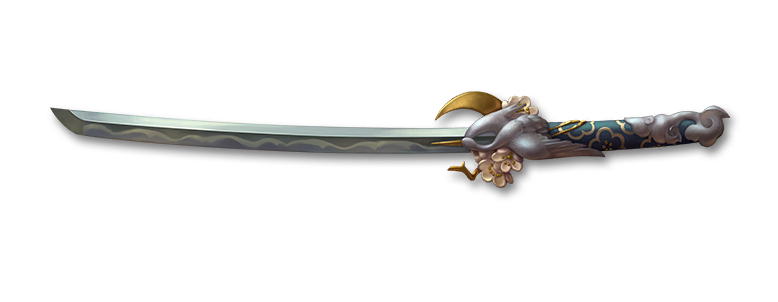
Create assets/sprites/weapon.asset:
type=spritetexture=textures/weapon.pngpixels_per_unit=100A texture is the PNG image. A sprite tells the game how to use that image. The descriptor’s texture path starts inside assets/. This is a small text file, not a Unity asset file. The PNG controls the shop icon; the core model used below controls the equipped weapon’s appearance.
5. Register the weapon
Section titled “5. Register the weapon”Create scripts/main.lua:
local sf2 = require("sf2")
local weapon = sf2.items.register_weapon {    id = "training_blade",    display_name = sf2.localization.key("weapon.training_blade"),    icon = sf2.assets.sprite("sprites/weapon"),    model = sf2.assets.model("core:gamedata/models/mdl_weapon_katana_ritual"),    subtype = "Katana",}
sf2.shop.add_item {    section = sf2.shop.WEAPONS,    item = weapon,    level = 1,    price = sf2.price.coins(1),}
sf2.log.info("Training Blade registered")
Here is what the script does:
require("sf2")loads the API into a variable calledsf2.register_weapondefines the item and returns a handle, stored inweapon.localization.keyfinds its translated name.assets.spritefinds your descriptor; omit.assetin this reference.assets.modelreuses the core katana model. Keepsubtype = "Katana"with this model.shop.add_itemmakes the weapon purchasable. Registration alone does not put an item in the shop or in your inventory.log.infowrites a message so you can tell that the script reached the end.
The local item ID becomes tutorial.blade:items/weapon/training_blade. The variable weapon holds a handle, not this string; passing it to the shop preserves the item’s type and identity.
6. Enable and test it
Section titled “6. Enable and test it”- Start Eclipse and open Mods on the title screen.
- Enable Training Blade, inspect Details if it reports a problem, and choose Apply & Restart.
- Enter Campaign, open the weapon shop, and find Training Blade. Use a profile that has reached the shop.
- Buy it for one coin, equip it, and enter a fight. It should use the borrowed katana model.
If something fails, start with troubleshooting. A missing mod usually means the folder or manifest is wrong. A listed mod with an error usually means a dependency, script, localization, or asset reference needs fixing.
7. Make one change
Section titled “7. Make one change”Exit the game, change the displayed name in eng.toml, save, and launch again. You should see the new name in the shop. Next, try changing the price from 1 to 5. Saving a script does not update the running game.
For a separately distributed mod, change the folder name, manifest id, name, and authors before publishing. Use a unique ID, such as yourname.training. Keep that ID and the item’s local ID stable after players start using it.
Continue with other equipment types, battles and opponents, or perks and enchantments. The function index links every callable function and combat callback.